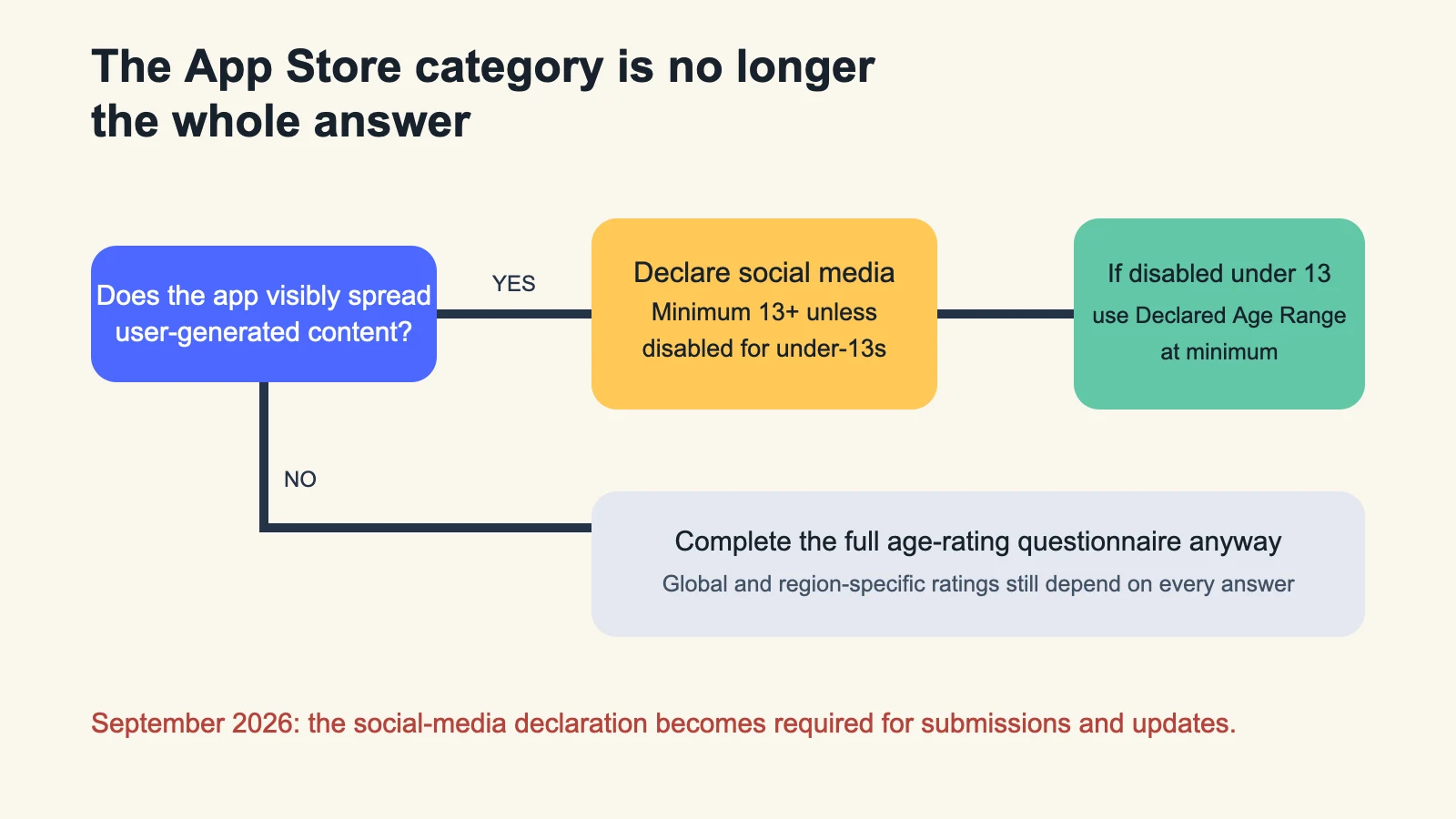
A social feature can change where an app appears in Screen Time and raise its minimum rating—even when “Social Networking” is not its App Store category.
A drawing app lets people publish work to a feed, follow creators and amplify posts. Its primary App Store category is Graphics & Design. Under Apple’s iOS 27 rules, that category does not settle the Screen Time question. The feed may count as a social media capability, placing the app in the Social Media Time Allowance category and setting a minimum age rating of 13+ unless the capability is disabled for users under 13.
The deadline is close enough to become release work. Apple says the age-rating questionnaire began adding the social-media question in July 2026. Starting in September 2026, developers must answer it to submit a new version or update to the App Store, and for notarization on alternative marketplaces. This is a metadata change with product consequences.
First, decide whether the product spreads content
Apple’s definition focuses on whether people can redistribute, amplify or interact with user-generated content through a social feed or a similar discovery surface that visibly spreads content to many users. A team should therefore review the shipped behavior, not the category label or the feature’s internal name.
| Product behavior | Question to verify | Owner | Evidence before submission |
|---|---|---|---|
| User posts | Can content reach people beyond a private, fixed group? | Product | Current feed and privacy-state screenshots |
| Reposts or shares | Can one user amplify another user’s content? | Mobile | Build showing share destinations and restrictions |
| Discovery feed | Does ranking expose user content to a wider audience? | Trust & Safety | Ranking and moderation rules |
| Under-13 restriction | Is the social capability actually unavailable for that age range? | Identity | Declared Age Range path and denial test |
| Store declaration | Do questionnaire answers match the production build? | Release manager | Dated App Store Connect review |
The Time Allowance category and the App Store category are different systems
Entertainment and Games apps enter their corresponding Time Allowance categories based on the primary or secondary category selected in App Store Connect. Social Media works differently: Apple bases it on declared capability, regardless of the discovery category. An app can therefore keep its Graphics, Education or Productivity category while still being treated as Social Media for Time Allowances.
If the app declares social media capabilities, Apple says it will receive a minimum 13+ rating. If those capabilities are disabled for anyone under 13, the app will not be placed in the Social Media Time Allowance category for those younger users. Apple also requires the app to use the Declared Age Range API at minimum for that path. The actual date of birth is not disclosed; the framework provides an age range chosen under Apple’s privacy model.
Do not update the questionnaire before the product rule exists
A declaration that says “disabled under 13” is not merely copy. The restriction needs an enforceable runtime path. Define what happens when age data is unavailable, the parent declines sharing, a signed-out user opens the feature, an existing account crosses a regional requirement, or the social surface is reached through a notification or deep link.
Keep a conservative fallback. If the app cannot establish that the capability is allowed, do not show the social surface. Test the restriction against every entrance, not just the onboarding flow. A settings toggle that hides the feed while push notifications still open individual posts is not a complete boundary.
Re-run the full age-rating questionnaire
Social media is one answer in a broader workflow. Apple calculates ratings from content descriptors, in-app controls and capabilities, and can assign region-specific results. App Store Connect requires an age rating before publication; an Unrated app cannot ship through the App Store. Teams should review user-generated content, messaging, advertising, gambling or chance-based mechanics, unrestricted web access and parental controls against the production build.
Apple allows a developer to override the calculated rating upward. If an app’s EULA sets a higher minimum age, Apple says that higher requirement must be reflected. The override applies globally, while displayed values can still differ under regional systems. Record the questionnaire answers and screenshots with the release ticket so a later feature change has an audit trail.
A seven-step September release gate
- Inventory every surface where user-generated content can spread.
- Decide whether the shipped behavior matches Apple’s social-media description.
- If restricting under-13 access, implement and test the Declared Age Range path.
- Verify signed-out, no-consent, deep-link and notification failure states.
- Review every age-rating answer against the current build.
- Capture global and region-specific results in the release record.
- Submit a TestFlight build early enough to fix a product mismatch before the September gate.
The key distinction is simple: the store form now asks a question about how the product behaves. Treat it like release code. The Neyrotex Mobile hub keeps the broader platform checklist, our Android 17 migration guide covers the parallel compatibility work, and the mobile release audit is the next step when metadata, identity and runtime rules need one owner.
Sources
- Apple Developer — Introducing Time Allowances, June 8, 2026.
- Apple — Set an app age rating, accessed August 11, 2026.
- Apple — Design safe and age-appropriate experiences, accessed August 11, 2026.