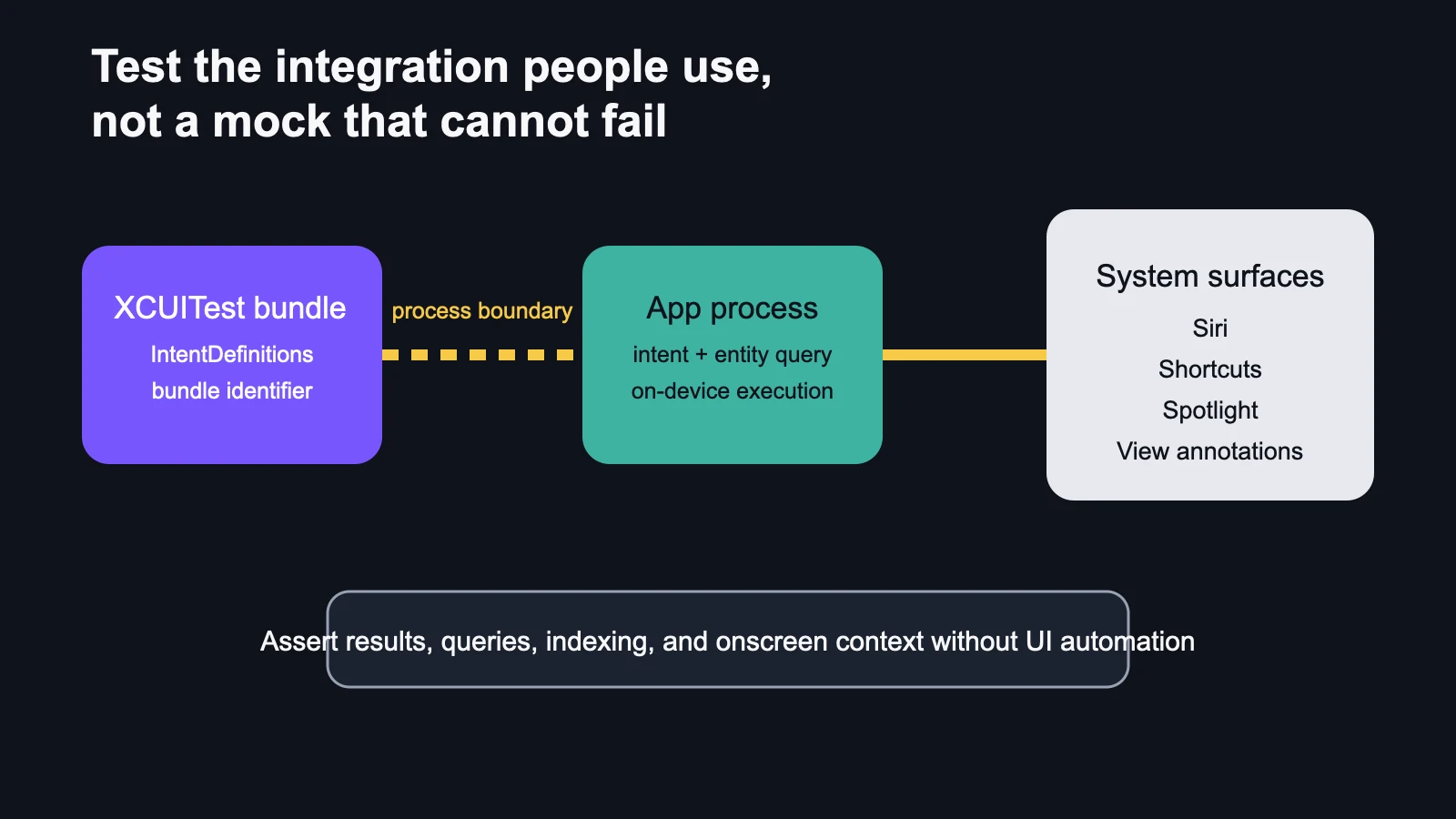
AppIntentsTesting runs through the system integration path, across process boundaries. That makes it useful for failures a unit test cannot see.
The shortcut still appears. The intent still compiles. The unit test is green. Yet Spotlight returns no entities because the production query changed its identifier mapping. This is the kind of small failure that slips between an app’s internal test suite and the system surface where a person actually meets it.
macOS 27 expands App Intents as the connective tissue for Siri, Shortcuts and Spotlight. Apple also introduced the beta App Intents Testing framework, which runs intents, entity queries and integration checks out of process. It is not a replacement for unit tests or one manual Siri conversation. It covers a different seam.
Start with the finished behavior
Choose one action that matters outside the app: create a document, find a project, start a timer, add an event or open the entity currently visible onscreen. Write the acceptance rule in user terms. For example: “When a person asks Siri to open the project named Atlas, the system resolves the existing Atlas entity and opens its detail view without creating a duplicate.”
That sentence exposes four things to verify: intent discovery, parameter resolution, entity lookup and the final effect. A unit test around perform() may cover only the last one.
| Layer | Useful for | Blind spot | Release detector |
|---|---|---|---|
| Pure unit test | Domain rules and error handling | System discovery and process boundaries | Fast suite on every commit |
| AppIntentsTesting | Intent execution, entity queries, results, Spotlight and annotations | Natural-language variability and final UI presentation | Integration suite on supported OS beta/final |
| Manual system pass | Real phrasing, permissions and visible handoff | Poor repeatability | Short release checklist |
| Production signals | Failures at scale | Limited context unless errors are instrumented | Intent error and zero-result telemetry |
Create the test target with the right identity
Apple’s WWDC26 walkthrough starts with an XCUITest bundle. The test runner and the app must use the same development team for code signing. The test target identifies the app by bundle identifier, then creates an IntentDefinitions object that exposes the app’s registered intents, entities, enums and queries by name.
This architecture is intentional. The test target does not link against the app target or share its process state. It builds a type-erased representation of the intent, supplies parameters and runs the intent on device across the process boundary. The result comes back for assertions. That path is closer to Siri or Shortcuts than a direct method call.
Test execution and result semantics together
A “no crash” assertion is too weak. Verify the returned entity, its stable identifier and the observable side effect. For a create action, confirm that one object exists with the expected properties. Run the same request again and decide whether the product should create a second object, update the first or report a conflict. App Intents are often retried or composed; idempotency deserves an explicit rule.
Include error cases that system surfaces can explain: unavailable account, missing permission, stale entity, offline data and a parameter that resolves to multiple candidates. The test should validate the structured result and the app state, not a brittle sentence rendered by Siri.
Entity queries are where discoverability quietly breaks
Siri and Shortcuts depend on queries to find the right entity from a name, identifier or suggested list. Test exact identifiers, case and punctuation variations, duplicate names, deleted objects and an empty result. If an entity identifier changes after a data migration, keep a compatibility lookup or make the failure explicit.
Apple’s session demonstrates testing string queries and suggested entities. The practical release rule is broader: every entity exposed to a system surface needs stable identity, predictable query behavior and a recovery path when the local database no longer contains it.
Verify Spotlight indexing and view annotations
macOS 27 adds entity schemas that contribute app content to Spotlight’s semantic index, while view annotations map visible views to entities so a person can refer conversationally to “this project” or “the file on screen.” Apple says AppIntentsTesting can verify both integrations without driving the interface through coordinate-based automation.
For Spotlight, assert that the correct entities are indexed and removed when data changes. For view annotations, verify that the onscreen context points to the intended entity rather than a parent container or stale selection. This is privacy-sensitive context: annotate only what the system needs to fulfill the person’s request.
Keep the beta boundary visible
Apple labels AppIntentsTesting as beta software and warns that the API can change before final operating-system releases. Pin tests to the current Xcode 27 beta in a separate CI lane, then rerun them on the release candidate and final macOS 27 SDK. Do not let a green beta lane silently become the only release gate for earlier macOS versions.
The framework also cannot prove that every natural-language phrase works across languages and regions. Keep a small manual matrix for the highest-value actions, permission states and locales. The deterministic suite catches integration regressions; the manual pass checks the conversation and handoff.
The working rule
Unit-test the domain, use AppIntentsTesting for the system path, and manually inspect the last human-facing mile. Begin at the Neyrotex Desktop hub, compare platform boundaries in our Windows app development guide, and use the desktop integration review when one workflow must survive Siri, Spotlight and the app itself. The test suite should fail where the user would notice—not only where the code is easiest to call.