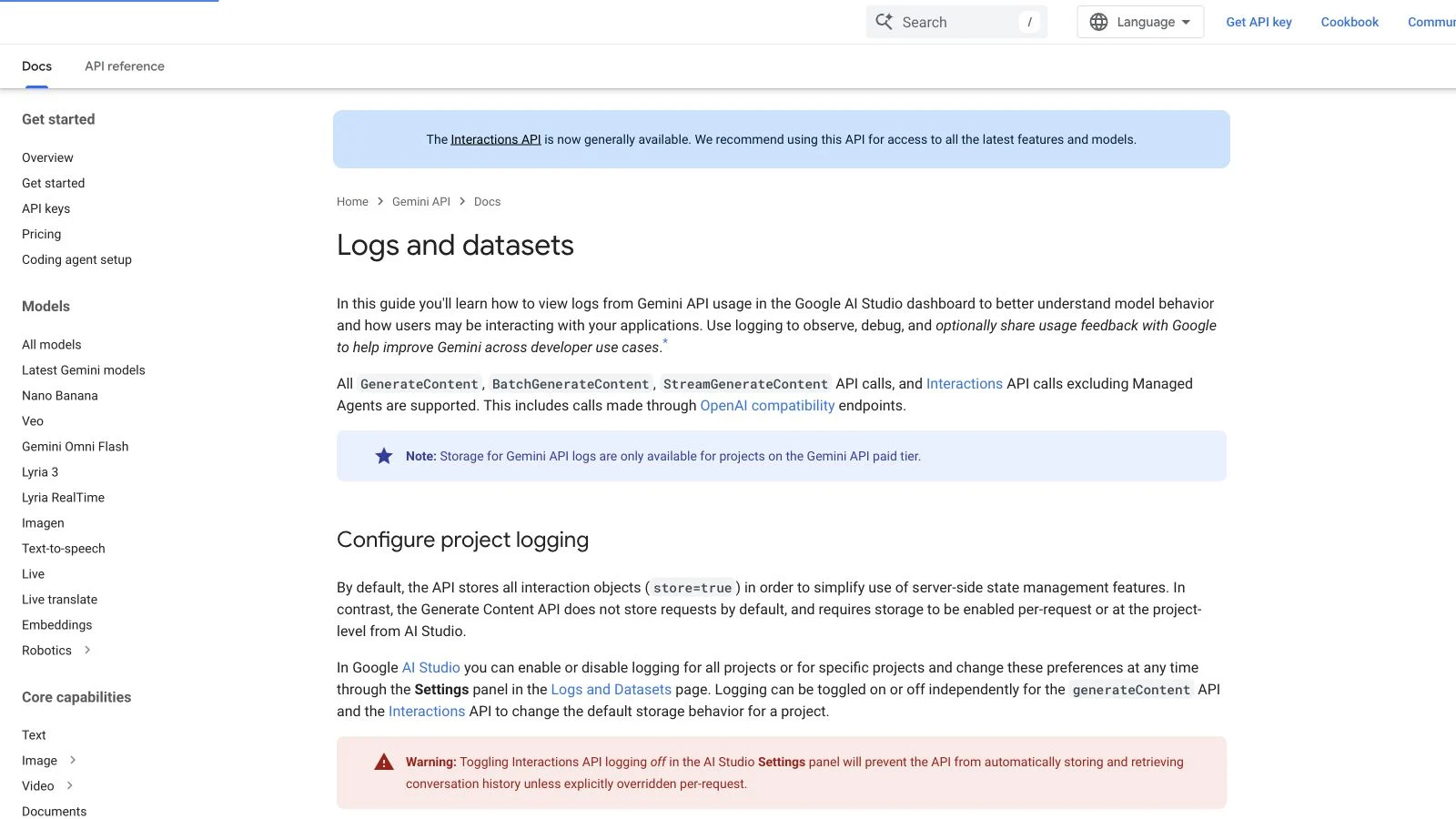
Gemini now exposes developer logs in AI Studio, but Interactions and GenerateContent begin with different storage defaults. The safe setup starts with a retention decision, not a dashboard toggle.
A team opens the new Logs page to diagnose a tool call. That seems like an observability decision. It is also a data-retention decision: Google says the Interactions API stores requests by default with store=true, while GenerateContent begins with store=false. A project can therefore change how much prompt and response data it keeps simply by moving a workflow between API surfaces.
The practical question is not “should we turn logs on?” It is: which requests may be stored, for how long, who may inspect them, and which product features depend on that storage? This guide maps those decisions from Google’s current documentation. It does not claim access to a production Gemini project or a private log review.
Start with the product feature that needs state
Interactions uses stored resources to continue a conversation with previous_interaction_id, inspect execution steps, and support background work. Google’s Interactions overview says store=false prevents both background execution and later continuation through previous_interaction_id. Statelessness is therefore not a free privacy switch; it changes the product architecture.
GenerateContent follows the inverse default. Calls are not logged unless storage is enabled for the request or project. A stateless classifier may need no retained payload. A multi-turn agent may need state, but only for a bounded window. A debugging sample may be worth retaining after redaction, while the raw customer conversation is not.
| Moment | Platform behavior | Owner decision |
|---|---|---|
| Request | Interactions defaults to store=true; GenerateContent defaults to store=false |
Override per request when the payload’s sensitivity differs from the project default |
| Debugging | Paid-tier logs can expose prompts, responses, metadata, and prior-turn context | Restrict access and redact before a payload becomes a reusable fixture |
| Retention | Google documents 7, 14, 28, or 55-day project windows; 55 days is the default maximum | Choose the shortest period that still supports the operational job |
| Dataset | Selected logs can outlive the normal window; contribution to Google is optional | Separate internal retention from sharing and exclude personal, sensitive, or confidential data |
Do not confuse project logging with model-training consent
Google’s Data Logging and Sharing policy describes logs as developer-owned API data private to the Cloud project. Sharing is a separate opt-in action: a developer can add selected logs to a dataset and may choose to contribute that dataset to Google. Contributed datasets are handled under terms for unpaid services and may be used to improve products and models. The documentation explicitly warns against including personal, sensitive, or confidential information.
That distinction should appear in the runbook. “Stored for our debugging” and “shared for product improvement” are different states, with different approvals. A thumbs-down rating and written feedback also transmit the selected interaction back to Google. Treat those controls as outbound data actions, not harmless dashboard annotations.
Choose one of three operating modes
Stateless by default
Use this for requests that can be reconstructed without server-side conversation history. Set store=false explicitly, keep redacted application metrics, and retain a synthetic fixture for reproducibility. The tradeoff is losing Interactions continuation and background execution for that request.
Stateful, short-lived conversation
Use store=true when continuation is a real product requirement. Set a short project retention window, document deletion behavior, and ensure the UI does not promise a conversation will resume after the server record expires. The log becomes an operational asset with access controls, not a casual developer convenience.
Debug sample, deliberately promoted
Keep broad logging off for sensitive traffic. When a defect needs inspection, reproduce it with synthetic or redacted input, store that interaction, then promote only the minimum useful record into an internal dataset. A dataset should have an owner, purpose, review date, and explicit sharing status.
A release checklist for logging changes
- Inventory each Gemini call path and note whether it uses Interactions, GenerateContent, Batch, streaming, or an OpenAI-compatible endpoint.
- Record the effective
storevalue at the request and project levels. - Test the feature with storage disabled; list exactly which capabilities stop working.
- Set retention to the shortest supported window that meets incident-response needs.
- Separate log access from dataset creation and dataset sharing permissions.
- Verify deletion and an expired-conversation recovery path with non-sensitive fixtures.
Official sources
- Gemini API — Logs and datasets, checked August 18, 2026.
- Gemini API — Data Logging and Sharing, checked August 18, 2026.
- Gemini API — Interactions API, checked August 18, 2026.
- Gemini API — Zero data retention, checked August 18, 2026.
- Gemini API — Release notes, developer logs entry dated July 6, 2026.